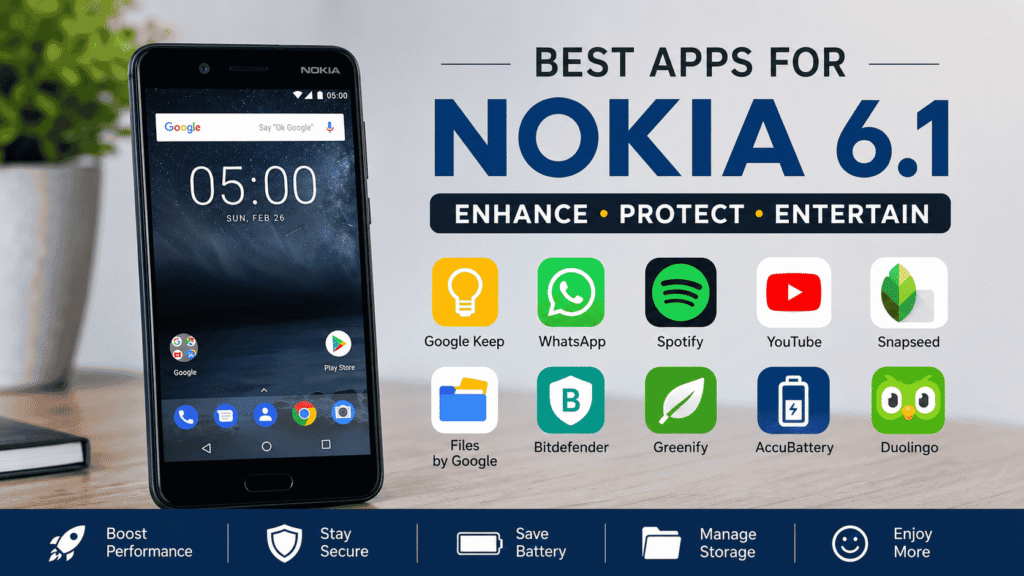
The Nokia 6.1 may not be the newest smartphone around, but it still has a loyal fan base. And honestly, that’s not surprising. The nokia 6.1 apps offers solid build quality, a clean Android experience, and enough power for everyday tasks.
If you’re still using this device, choosing the right apps can make a huge difference. Good apps can help you stay productive, save storage space, improve battery life, and simply make the phone more enjoyable to use.
In this guide, we’ll look at some of the best Nokia 6.1 apps you should consider downloading. Whether you use your phone for work, entertainment, photography, or communication, there’s something here for everyone.
Why Apps Matter on the Nokia 6.1
One of the biggest advantages of the Nokia 6.1 is its clean Android software. Unlike some phones packed with unnecessary apps, Nokia kept things simple.
That means you can install only the apps you actually need.
The right apps can help you:
- Stay organized
- Improve productivity
- Enjoy better entertainment
- Edit photos professionally
- Protect your personal information
- Keep your device running smoothly
A few smart downloads can completely change your experience.
Quick Overview of the Nokia 6.1
Before diving into app recommendations, let’s take a quick look at what the phone offers.
| Feature | Specification |
|---|---|
| Display | 5.5-inch Full HD |
| Processor | Snapdragon 630 |
| RAM | 3GB or 4GB |
| Storage | 32GB or 64GB |
| Battery | 3000mAh |
| Rear Camera | 16MP |
| Front Camera | 8MP |
| Software | Android One |
These specs may seem modest today, but they are still capable of handling many popular Android apps without major issues.
Best Productivity Apps for Nokia 6.1
Let’s start with productivity.
After all, many people use their phones for work, studies, and daily planning.
Google Keep
Google Keep is one of those apps that doesn’t get enough attention.
It’s simple. Fast. And incredibly useful.
You can:
- Create notes
- Make shopping lists
- Save ideas
- Record voice notes
- Add reminders
Everything syncs with your Google account, so your notes are available across devices.
Microsoft OneNote
If Google Keep feels too basic, OneNote might be a better fit.
It’s designed for people who need more organization.
Features include:
- Multiple notebooks
- Sections and categories
- Handwritten notes
- Cloud syncing
Students and professionals often love OneNote because it can store a lot of information neatly.
Google Calendar
Missing appointments is frustrating.
Google Calendar helps keep everything organized.
You can schedule:
- Meetings
- Birthdays
- Deadlines
- Events
And because it syncs automatically, you’ll always have access to your schedule.
Best Messaging and Communication Apps
A smartphone without communication apps isn’t really a smartphone anymore.
Here are some must-have options.
This one is obvious.
WhatsApp remains one of the most popular messaging apps in the world.
It allows you to:
- Send messages
- Make voice calls
- Video chat
- Share files
- Create group chats
The nokia 6.1 apps handles WhatsApp very well.
Telegram
Telegram continues to grow every year.
Many users prefer it because of its privacy-focused features.
Some highlights include:
- Fast messaging
- Cloud-based storage
- Large group support
- Secret chats
It’s worth having alongside WhatsApp.
Zoom
Remote work and online meetings are common these days.
Zoom makes it easy to join meetings from your nokia 6.1 apps.
The app works surprisingly well even on older devices.
Best Entertainment Apps
Sometimes you just want to relax.
These entertainment apps can help.
Spotify
Spotify is one of the best music streaming platforms available.
You can:
- Listen to millions of songs
- Create playlists
- Download music
- Follow podcasts
Whether you’re working out or commuting, Spotify is hard to beat.
YouTube
Let’s be honest.
Most people spend a lot of time on YouTube.
The platform offers:
- Tutorials
- Entertainment
- Reviews
- News
- Educational content
The Full HD display on the Nokia 6.1 still provides a pleasant viewing experience.
Netflix
Movie lovers should definitely install Netflix.
The app offers:
- Movies
- TV shows
- Documentaries
- Original content
Offline downloads are especially useful when traveling.
Best Photography Apps for Nokia 6.1
The nokia 6.1 apps camera is decent, but editing apps can make your photos look much better.
Snapseed
Snapseed is often considered one of the best free photo editors.
And honestly, it’s easy to see why.
Features include:
- Filters
- Cropping tools
- Color correction
- HDR effects
- Professional editing controls
Best of all, it’s completely free.
Adobe Lightroom
If you want more advanced editing tools, Lightroom is worth downloading.
You get:
- Professional adjustments
- Presets
- Detailed color controls
- Cloud syncing
Many photographers rely on Lightroom daily.
Canva
Canva isn’t just for graphic designers.
You can use it to create:
- Social media posts
- Thumbnails
- Presentations
- Marketing graphics
The mobile app is surprisingly powerful.
Best Security Apps for Nokia 6.1
Security is something many people ignore until a problem happens.
A few security apps can provide extra peace of mind.
Bitdefender Mobile Security
Bitdefender offers excellent protection against malware and suspicious activity.
Key features include:
- Virus scanning
- App security checks
- Privacy monitoring
- Web protection
The app is lightweight and doesn’t slow down the phone.
Google Find My Device
This app is almost essential.
If your phone gets lost, Find My Device can help you:
- Locate it
- Ring it remotely
- Lock it
- Erase personal data
Hopefully you’ll never need it, but it’s good to have.
Best Storage Management Apps
Storage can become a problem on older phones.
Fortunately, there are apps that help.
Files by Google
This app is simple but very effective.
It can:
- Delete junk files
- Remove duplicates
- Free up storage
- Organize downloads
Many users are surprised by how much space it can recover.
Solid Explorer
If you want more control over files, Solid Explorer is a great option.
Features include:
- Advanced file management
- Cloud integration
- File encryption
- Network access
It’s especially useful for power users.
Best Battery Apps for Nokia 6.1
Battery life is important, especially as devices age.
AccuBattery
AccuBattery gives detailed information about battery health.
You can monitor:
- Charging speed
- Battery wear
- Screen usage
- Power consumption
It’s one of the most useful utility apps available.
Greenify
Greenify helps reduce background activity.
Benefits include:
- Longer battery life
- Better performance
- Reduced resource usage
For older phones, this can make a noticeable difference.
Best Learning Apps
Your phone can also help you learn new things.
Duolingo
Learning a new language has never been easier.
Duolingo offers short lessons that make learning fun.
Popular languages include:
- Spanish
- French
- German
- Japanese
- Italian
Even ten minutes a day can add up.
Khan Academy
Khan Academy provides free educational content for students and adults.
Topics include:
- Math
- Science
- History
- Economics
It’s one of the best free learning resources available.
How to Install Apps on Nokia 6.1
Installing apps is straightforward.
Step 1
Open the Google Play Store.
Step 2
Search for the app you want.
Step 3
Tap the Install button.
Step 4
Wait for the download to complete.
Step 5
Open the app and set it up.
That’s it.
Tips to Keep Your Nokia 6.1 Running Smoothly
Even though the nokia 6.1 apps is an older phone, you can still keep it performing well.
A few simple habits help.
- Remove apps you don’t use
- Keep storage free
- Restart the phone regularly
- Update apps when possible
- Avoid installing unnecessary background apps
These small steps can improve performance more than people realize.
Common Mistakes Users Make
Sometimes people accidentally slow down their phones.
Try to avoid these mistakes:
- Installing too many apps
- Downloading apps from unknown websites
- Ignoring software updates
- Filling storage completely
- Running several heavy apps at once
The nokia 6.1 apps performs best when kept clean and organized.
FAQs
Does Nokia 6.1 still support modern apps?
Yes. Most popular Android apps still work on the Nokia 6.1, although some newer apps may require updated Android versions.
Which app is best for cleaning storage?
Files by Google is one of the easiest and most effective options.
Is WhatsApp available on Nokia 6.1?
Yes. WhatsApp works smoothly for messaging, voice calls, and video calls.
Which photo editing app is best?
Snapseed is excellent for most users, while Lightroom is better for advanced editing.
Can Nokia 6.1 run streaming apps?
Absolutely. Spotify, YouTube, and Netflix all work well on the device.
Should I install antivirus software?
It’s optional, but apps like Bitdefender add extra protection and peace of mind.
Conclusion
The Nokia 6.1 may not be the latest smartphone, but it still has plenty of life left in it. With the right Nokia 6.1 apps, you can improve productivity, boost security, enjoy entertainment, and even extend the device’s usefulness.
Apps like Google Keep, WhatsApp, Spotify, Snapseed, Files by Google, and AccuBattery continue to work well and provide real value. The key is choosing apps that serve a purpose instead of filling your phone with things you’ll never use.
At the end of the day, a well-maintained Nokia 6.1 with the right apps can still be a reliable companion for work, communication, learning, and entertainment.