Finding a passport parking app spot is hard enough sometimes.
Then you have to deal with parking meters, coins, payment kiosks, and keeping track of how much time is left. It can be a little frustrating, especially when you’re in a hurry.
That’s one reason why mobile parking apps have become so popular.
The passport parking app is one of the most widely used parking payment apps in many cities across North America. It allows drivers to pay for parking directly from their smartphones without needing cash or physical tickets.
Instead of running back to a meter, you can manage everything from your phone.
Pretty convenient, honestly.
In this guide, we’ll cover how the app works, its features, benefits, common problems, and solutions. We’ll also discuss topics people frequently search for, including passport parking app not working, passport parking app zone map, and passport parking app discount code.
What Is the Passport Parking App?
The Passport Parking App is a mobile application that lets users pay for parking digitally.
Rather than using coins or card-operated parking meters, drivers can pay through the app in just a few taps.
The app is used by:
- Cities
- Universities
- Airports
- Public parking lots
- Private parking facilities
Its main purpose is simple.
Make parking easier.
And for many users, it does exactly that.
Why People Use the Passport Parking App
Parking technology has changed a lot over the last decade.
Many drivers prefer mobile payments because they’re faster and more convenient.
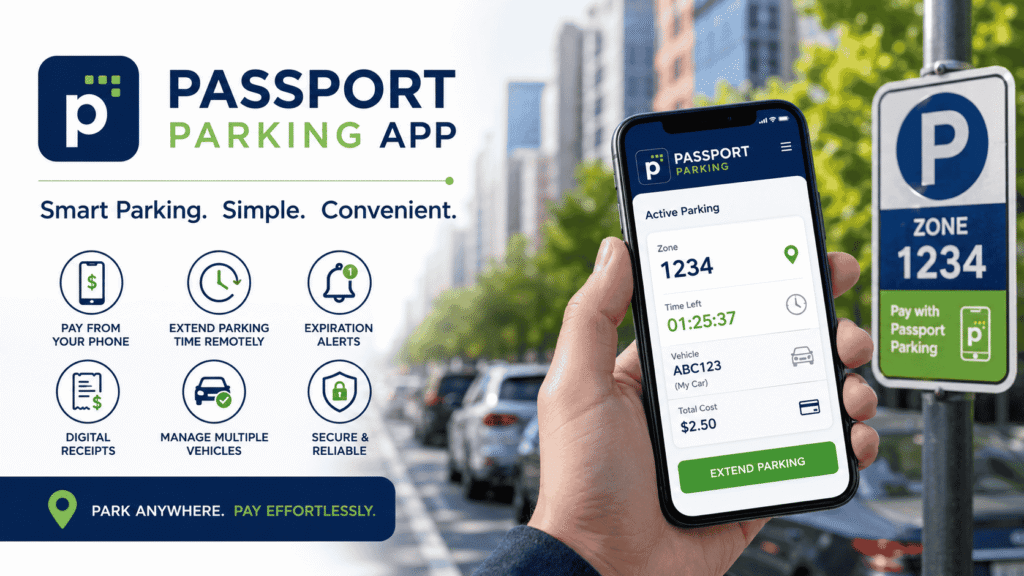
Some advantages include:
- No need for cash
- Easy parking extensions
- Payment history tracking
- Parking reminders
- Digital receipts
- Multiple vehicle management
These small features save time and reduce stress.
Especially when you’re running late.
How the Passport Parking App Works
Using the app is fairly straightforward.
Even first-time users can usually figure it out quickly.
Here’s how it works.
Step 1: Download the App
The app is available for both Android and iPhone users.
Simply install it from your device’s app store.
Step 2: Create an Account
You’ll need to enter:
- Email address
- Phone number
- Password
The process only takes a few minutes.
Step 3: Add Your Vehicle
Next, enter your vehicle details.
Typically you’ll add:
- License plate number
- Vehicle nickname (optional)
This information can be saved for future use.
Step 4: Add a Payment Method
Most users add a credit or debit card.
Some locations may also support additional payment options.
Step 5: Enter the Zone Number
This is important.
The parking zone tells the system where your vehicle is parked.
We’ll discuss this in more detail later.
Step 6: Choose Your Parking Time
Select how long you want to park.
The app calculates the cost automatically.
Step 7: Confirm Payment
After payment is processed, your parking session becomes active.
That’s it.
No paper ticket needed.
Main Features of the Passport Parking App
The app offers several useful features beyond basic parking payments.
Mobile Parking Payments
This is the core feature.
Instead of carrying coins, users simply pay through their phones.
It’s faster and usually much easier.
Parking Session Extensions
Running late?
It happens.
Many participating locations allow users to extend parking time remotely.
You don’t have to walk back to the parking meter.
That feature alone can save a lot of headaches.
Expiration Alerts
Nobody enjoys parking tickets.
The app sends notifications before your parking session expires.
This helps drivers avoid accidental violations.
Multiple Vehicle Support
Some people manage more than one vehicle.
Families often do.
The Passport Parking App allows users to store multiple license plates within a single account.
Digital Receipts
Business travelers especially appreciate this feature.
The app keeps a record of parking transactions, making expense tracking much easier.
Benefits of Using the Passport Parking App
The biggest benefit is convenience.
But there are others too.
Saves Time
Parking payments can be completed in seconds.
No searching for spare change.
No waiting at kiosks.
Reduces Stress
Parking reminders provide peace of mind.
You don’t have to constantly check the time.
Easy Payment Tracking
Every transaction is recorded digitally.
That makes budgeting and expense reporting simpler.
Contactless Payments
Many users now prefer contactless transactions.
Mobile parking apps fit perfectly into that trend.
Understanding the Passport Parking App Zone Map
One phrase people search quite often is passport parking app zone map.
So what exactly does that mean?
A parking zone is a designated area where parking payments are assigned.
Each zone has its own number.
When starting a parking session, users enter that zone number into the app.
The system then knows exactly where the vehicle is parked.
Where to Find Zone Numbers
Zone numbers are usually displayed on:
- Parking signs
- Parking meters
- Parking kiosks
- Parking lot entrances
Always double-check the number before paying.
Entering the wrong zone could cause problems.
Why the Zone Map Matters
The passport parking app zone map helps parking operators organize different parking areas.
It also helps enforcement officers verify active parking sessions.
Without zone information, the system wouldn’t know where your payment belongs.
Passport Parking App Not Working? Common Reasons
Sometimes users experience technical issues.
One of the most searched questions online is passport parking app not working.
Fortunately, most problems are relatively easy to fix.
Poor Internet Connection
The app requires internet access.
If your signal is weak, payments may fail.
Outdated App Version
Older app versions can sometimes cause bugs or login problems.
Updating the app often resolves these issues.
Payment Method Errors
A declined card can prevent parking sessions from starting.
Check that your payment information is correct.
Server Maintenance
Occasionally, maintenance work may temporarily affect service.
These outages are usually short.
Incorrect Zone Information
Entering an invalid zone number may cause payment errors.
Double-check before submitting.
How to Fix Passport Parking App Problems
If you’re facing a passport parking app not working issue, try these solutions.
Restart the App
Close the application completely.
Then reopen it.
It sounds simple, but it often works.
Check Internet Access
Try switching between:
- Mobile data
- Wi-Fi
A stronger connection may solve the problem.
Update the Application
Visit your app store and install any available updates.
Developers frequently release bug fixes.
Verify Payment Details
Check:
- Card expiration date
- Card number
- Available funds
Small mistakes can sometimes cause payment failures.
Restart Your Phone
This basic step can fix many temporary software issues.
Contact Support
If none of the above works, customer support may be able to assist.
Passport Parking App Discount Code Information
Many users search for a passport parking app discount code hoping to reduce parking costs.
And honestly, who doesn’t like saving money?
Are Discount Codes Available?
Sometimes.
Discounts are usually offered through:
- Local cities
- Universities
- Special events
- Promotional campaigns
Availability depends on location.
Not every parking operator participates.
Where to Find a Passport Parking App Discount Code
Potential sources include:
- Municipal websites
- University parking departments
- Event organizers
- Promotional emails
It’s worth checking before parking.
You might get lucky.
Other Ways to Save
Even without a passport parking app discount code, there are ways to reduce costs.
For example:
- Use lower-cost parking zones
- Avoid overtime charges
- Consider monthly parking programs
- Monitor parking rates carefully
Small savings add up over time.
Passport Parking App vs Traditional Parking Meters
Here’s a quick comparison.
| Feature | Passport Parking App | Traditional Meter |
|---|---|---|
| Mobile Payment | Yes | No |
| Parking Extensions | Yes | No |
| Expiration Alerts | Yes | No |
| Digital Receipts | Yes | No |
| Cash Required | No | Usually |
| Convenience | High | Moderate |
The difference is pretty clear.
Mobile parking offers much more flexibility.
Tips for Getting the Most Out of the App
A few simple habits can improve your experience.
Enable Notifications
Parking reminders are one of the app’s most useful features.
Make sure notifications are turned on.
Save Vehicle Information
Entering license plate details every time can become annoying.
Save them once and move on.
Double-Check Zone Numbers
Always verify parking zones before paying.
This helps prevent mistakes.
Keep the App Updated
Updates often include bug fixes and performance improvements.
FAQs
Is the Passport Parking App free?
Yes. Downloading the app is free. Users only pay parking fees and any applicable service charges.
Can I extend parking time remotely?
In many locations, yes. However, local parking regulations may limit extensions.
What should I do if the passport parking app not working issue happens?
Check your internet connection, update the app, verify payment details, and restart your device.
How do I find my parking zone?
Zone numbers are typically displayed on signs, kiosks, and parking meters.
Is there a passport parking app zone map?
Many participating parking operators provide zone information through signage or online resources.
Can I use a passport parking app discount code?
Sometimes. Availability depends on local promotions and participating parking operators.
Is the app secure?
Yes. The app uses secure payment processing systems to protect user information.
Conclusion
The passport parking app has made parking much easier for millions of drivers. Instead of dealing with coins, meters, and paper tickets, users can handle everything directly from their smartphones.
Features like parking reminders, remote extensions, digital receipts, and mobile payments make the app both practical and convenient. Understanding how the system works, how the passport parking app zone map functions, where to find a possible passport parking app discount code, and how to troubleshoot a passport parking app not working issue can help you get the most value from the platform.
For drivers looking for a simple and modern parking solution, the Passport Parking App remains one of the best options available today.