
If you’ve searched for Picuki IG Viewer, you’re probably looking for a way to browse Instagram profiles, posts, or stories without logging into an account. Whether you want to explore public content anonymously, check a creator’s profile, or simply learn how the platform works, it’s important to understand what Picuki can actually do—and what it can’t.
Millions of users search for Picuki IG Viewer every month because it offers a quick way to browse public Instagram profiles without creating an account. However, understanding its limitations is just as important as knowing its features.
Picuki has become one of the most popular browser-based Instagram viewers because it allows users to access publicly available Instagram content without installing the Instagram app or signing in. Many people use it to explore public profiles, hashtags, captions, and, when available, stories. However, there are also many misconceptions about its capabilities, especially regarding private accounts and anonymous viewing.
In this complete guide, you’ll learn what Picuki IG Viewer is, how it works, its key features, safety considerations, common limitations, and the best alternatives available in 2026. By the end, you’ll have a clear understanding of whether Picuki is the right Instagram viewer for your needs.
If you’re looking for another browser-based Instagram viewer, you may also find our Instapv Guide helpful for comparing similar tools.
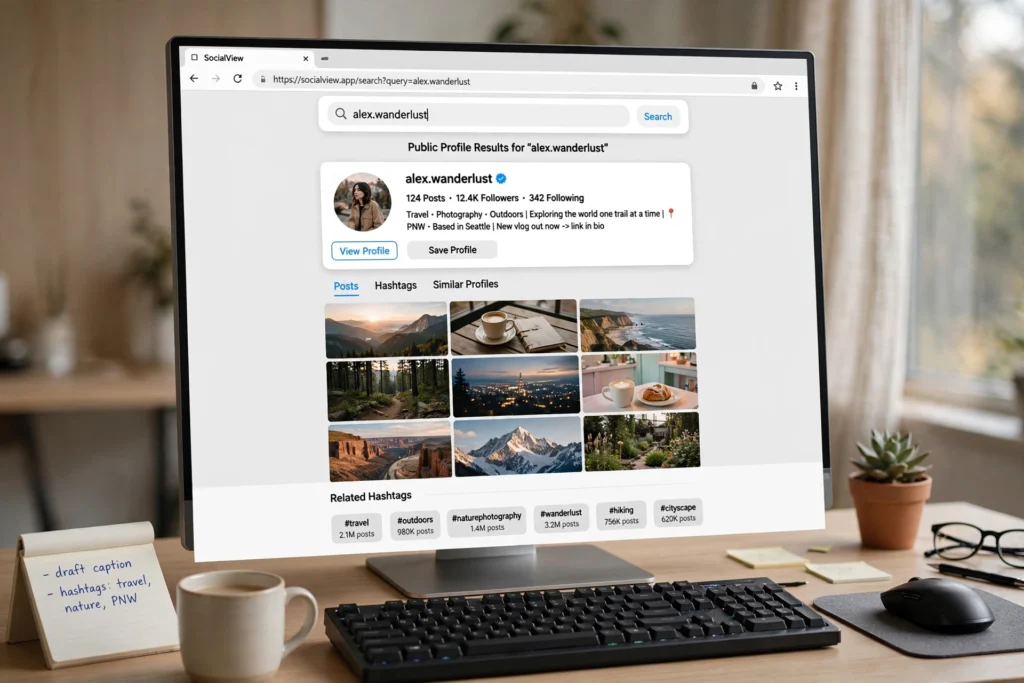
What Is Picuki IG Viewer?
Picuki IG Viewer is a browser-based Instagram viewer that allows users to browse publicly available Instagram content without logging into an Instagram account. Instead of installing the Instagram app or creating a new account, users simply enter the username of a public Instagram profile to view available posts, profile information, hashtags, and, in some cases, active stories.
One of the biggest reasons Picuki became popular is its simplicity. Since it works entirely through a web browser, users can quickly access public Instagram profiles from a desktop, laptop, tablet, or smartphone without downloading additional software. This makes it a convenient option for people who only want to view public content occasionally.
It’s important to understand that Picuki does not bypass Instagram’s privacy settings. If an Instagram account is private, its posts, reels, stories, and profile information remain inaccessible unless you’re an approved follower. Any website claiming to unlock private Instagram accounts or reveal hidden content should be treated with caution.
Beyond casual browsing, Picuki is also used by digital marketers, content creators, researchers, and businesses who want to monitor public profiles, analyze competitors, discover trending hashtags, or gather content ideas without constantly switching between multiple Instagram accounts.
Although Picuki offers a convenient way to explore public Instagram content, its features can change over time because Instagram regularly updates its platform and policies. As a result, some functions may become temporarily unavailable or work differently than expected.

Why Do People Use Picuki IG Viewer?
People search for Picuki IG Viewer for different reasons, but the main attraction is its convenience. Instead of downloading the Instagram app or signing in with an account, users can quickly browse publicly available content through a web browser.
Below are some of the most common reasons people choose to use Picuki.
Browse Instagram Without an Account
Not everyone has an Instagram account, and some users simply don’t want to create one. Picuki allows them to search public profiles, view posts, and explore hashtags without registering or logging in.
View Public Profiles Quickly
Many users want to check a creator, celebrity, brand, or business profile without opening the official Instagram app. A browser-based viewer can make this process faster, especially on desktop devices.
Explore Trending Hashtags
Picuki also lets users search public hashtags, making it easier to discover popular topics, travel destinations, photography ideas, fashion inspiration, and other trending content.
Research Competitors or Content Ideas
Digital marketers, business owners, and content creators often review public Instagram profiles to study posting styles, captions, hashtags, and engagement strategies. While Instagram itself offers these features, some users prefer a simpler browser interface for quick research.
Browse Public Content Anonymously
One of the biggest reasons people search for Picuki is the possibility of browsing public Instagram content without logging into their own account. However, users should remember that feature availability may change over time as Instagram updates its platform.
Although Picuki offers convenience, it should only be used for viewing content that has been made publicly available. It cannot access private accounts or bypass Instagram’s privacy settings.

How Does Picuki IG Viewer Work?
Picuki IG Viewer is designed to display publicly available Instagram content through a web browser. Rather than asking users to sign in with an Instagram account, it retrieves information that is already visible to the public and presents it in a simple interface.
The exact features available can change over time because Instagram regularly updates its platform and policies. As a result, some functions may work differently or become unavailable.
Here’s how the process typically works.
Step 1: Visit the Picuki Website
Open your preferred web browser and navigate to the Picuki website. Since it’s browser-based, there’s usually no need to download software or install an application.
Step 2: Enter a Public Instagram Username or Hashtag
Type the username of a public Instagram profile or enter a hashtag into the search bar.
For the best results, double-check the spelling before searching. An incorrect username may return no results.
Step 3: Browse Public Content
If the account or hashtag is publicly accessible, Picuki may display information such as:
- Public profile details
- Photos and videos
- Captions
- Public Reels (when available)
- Hashtags
- Public Stories (feature availability may vary)
Only content that has been shared publicly can be displayed.
Step 4: Continue Browsing
Users can continue exploring available public content without logging into Instagram. This makes Picuki convenient for quick browsing, research, or viewing public profiles from a desktop or mobile browser.
Keep in mind that performance and available features may change as Instagram updates its security measures and access policies.
Note: Because Picuki relies on publicly available Instagram data, some features may stop working temporarily whenever Instagram updates its platform or access policies.
Before Using Picuki IG Viewer
Before using Picuki, it’s helpful to understand a few basic requirements. Knowing what the tool can and cannot do will help you avoid confusion.
| Requirement | Details |
|---|---|
| Public Instagram Profile | Only public accounts can be viewed. |
| Internet Connection | Required to load profile information and media. |
| Updated Browser | Chrome, Edge, Firefox, Safari, or Brave are recommended. |
| Correct Username | Enter the exact Instagram username for accurate results. |
| Browser Access | Picuki works through a web browser, so installation is generally not required. |
If you’re trying to access content from a private Instagram account, Picuki won’t be able to display it because Instagram’s privacy settings remain in effect.
These basic requirements help ensure the best browsing experience. If the username is incorrect or the account is private, Picuki won’t be able to display any content.
Supported Browsers
For the best experience, use an up-to-date browser such as:
- Google Chrome
- Microsoft Edge
- Mozilla Firefox
- Safari
- Brave
Using the latest browser version improves performance, compatibility, and security while browsing public Instagram content.

Key Features of Picuki IG Viewer
Picuki IG Viewer is known for offering a simple way to explore publicly available Instagram content through a web browser. Although its features may change over time, the platform generally includes several tools that make browsing easier for casual users.
View Public Instagram Profiles
One of Picuki’s main features is the ability to search and view public Instagram profiles without creating an account.
Users can typically see profile information such as profile photos, bios, and publicly shared posts, provided the account is not private.
Browse Public Posts
Picuki allows users to view photos and videos shared by public Instagram accounts.
This can be useful for checking a creator’s latest uploads, exploring business pages, or viewing content without opening the Instagram app.
Explore Hashtags
Unlike some Instagram viewer tools, Picuki also supports hashtag searches.
Users can browse publicly available posts related to popular hashtags, making it easier to discover trending topics, travel destinations, fashion ideas, or other areas of interest.
View Public Stories
Many users search for Picuki because they’re interested in viewing public Instagram Stories.
If a story is publicly available and the feature is currently supported, Picuki may display it. However, availability depends on Instagram’s policies and the current functionality of the platform.
Browser-Based Access
Since Picuki operates entirely through a web browser, users generally don’t need to install any software or mobile application.
This makes it accessible from desktops, laptops, tablets, and smartphones with an internet connection.
No Instagram Login Required
Another popular feature is that users can often browse public Instagram content without signing into an Instagram account.
This makes Picuki useful for users who only want quick access to public Instagram content without signing into an account.
Cross-Device Compatibility
Because Picuki is web-based, it works across multiple operating systems, including Windows, macOS, Android, and iOS.
Users simply need a supported browser and an active internet connection to access the platform.
What Can You Actually View with Picuki?
Many people assume Picuki can display every type of Instagram content, but that’s not the case.
Like other browser-based Instagram viewers, Picuki can only access information that has been made publicly available. It cannot bypass Instagram’s privacy settings or reveal content from private accounts.
The table below summarizes what users can typically view.
| Feature | Public Account | Private Account |
|---|---|---|
| Profile Information | Yes | No |
| Public Posts | Yes | No |
| Public Photos | Yes | No |
| Public Videos | Yes | No |
| Public Reels | Yes | No |
| Public Stories (when available) | Sometimes | No |
| Hashtags | Yes | No |
| Followers & Following Lists | Limited | No |
| Private Messages | No | No |
| Deleted or Archived Content | No | No |
If you come across a website claiming it can unlock private Instagram accounts, recover deleted posts, or reveal private messages, treat those claims with caution. Legitimate Instagram viewer tools cannot bypass Instagram’s privacy protections.
Is Picuki IG Viewer Safe to Use?
One of the most common questions users ask is whether Picuki IG Viewer is safe. The answer depends on which website you’re visiting and how you use it.
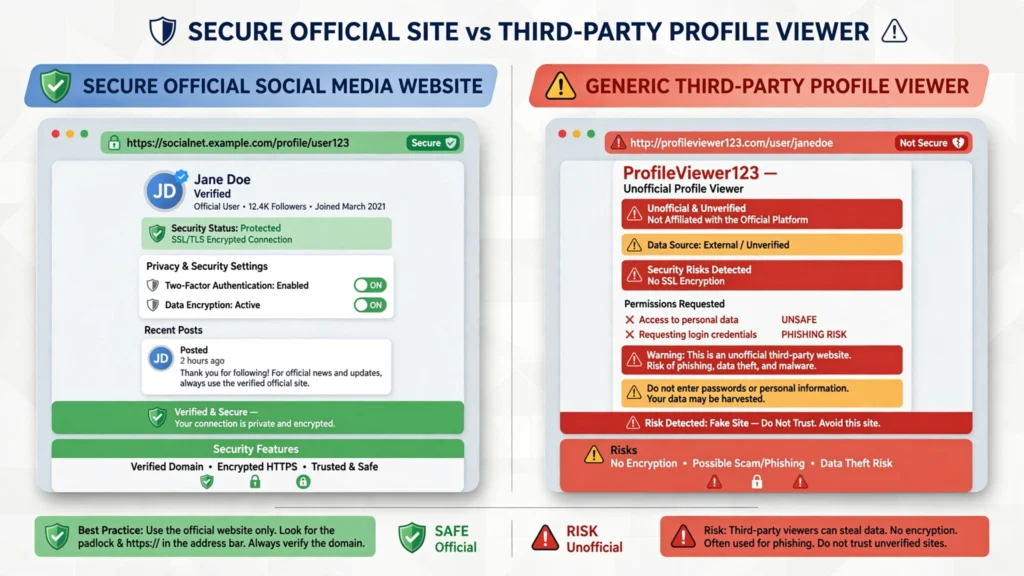
Viewing publicly available Instagram content through a reputable browser-based viewer is generally considered low risk. However, because Picuki is not an official Instagram or Meta product, users should remain cautious when using third-party websites.
Many copycat websites imitate popular Instagram viewer tools and may contain misleading advertisements, fake download buttons, or phishing attempts.
Following a few simple safety practices can help protect your privacy.
Never Enter Your Instagram Password
A legitimate Instagram viewer should not require your Instagram username and password just to display public profiles.
If a website asks you to log in with your Instagram credentials, leave the site immediately.
Check the Website Address Carefully
Many fake websites use names similar to Picuki to trick visitors.
Before using any Instagram viewer, verify that you’re on the correct website and avoid suspicious domains.
Avoid Downloading Unnecessary Software
Picuki is designed to work in a web browser.
If a website asks you to install an application, browser extension, or unknown software before viewing Instagram content, proceed with caution.
Be Careful with Advertisements
Some free tools rely on advertisements for revenue.
While normal ads are common, websites that constantly redirect users, open multiple pop-ups, or encourage unnecessary downloads should be avoided.
Respect Instagram Users’ Privacy
Picuki only displays publicly available content.
Even when content is public, users should respect creators by avoiding unauthorized downloading, copying, or redistribution of their work.
Remember that your online safety depends more on the website you visit than the tool itself. Always use trusted sources and avoid sharing your personal login credentials with unofficial services.
Pros and Cons of Picuki IG Viewer
Like most third-party tools, Picuki has both advantages and limitations. Understanding both can help you decide whether it’s suitable for your needs.
| Pros | Cons |
|---|---|
| No Instagram login required for public content | Cannot access private accounts |
| Easy browser-based interface | Features may change over time |
| Works on desktop and mobile browsers | Not officially affiliated with Instagram |
| No installation required | Some websites may contain advertisements |
| Supports public hashtag searches | Availability depends on Instagram policies |
| Useful for quick browsing | Limited compared to the official Instagram app |
Overall, Picuki is useful for viewing publicly available Instagram content, but it should not be expected to provide features that violate Instagram’s privacy policies.
Limitations of Picuki IG Viewer
While Picuki can be useful for browsing public Instagram content, it’s important to understand its limitations before relying on it regularly. Since it is a third-party tool, its functionality depends heavily on Instagram’s platform and policies.
Only Public Content Is Accessible
Picuki cannot display posts, stories, reels, or profile information from private Instagram accounts. If an account is set to private, you’ll need to be an approved follower to view its content through the official Instagram app.
Features May Stop Working
Instagram frequently updates its security systems and access policies. As a result, certain Picuki features, such as story viewing or hashtag searches, may stop working temporarily or become unavailable without notice.
Not Officially Affiliated with Instagram
Picuki is an independent third-party service and is not owned, operated, or endorsed by Instagram or Meta. This means there is no guarantee that all features will remain available over time.
Advertisements on Some Versions
Some versions or mirror websites may display advertisements, pop-ups, or redirects. For your safety, always verify that you’re using a trusted website and avoid entering your Instagram login credentials on unofficial platforms.
Is Picuki Still Working in 2026?
Picuki continues to appear online in 2026, but its functionality is not always consistent. Since Instagram regularly updates its security systems and access policies, third-party viewer tools may temporarily lose access to certain public content or experience server issues. Users sometimes report missing stories, unavailable search results, or loading errors.
If Picuki isn’t working, the problem may not be with your browser. It could simply be a temporary service interruption or a recent change to Instagram’s platform. Before assuming the website has permanently stopped working, try refreshing the page, checking another browser, or waiting for the service to update.
Because Picuki is not officially connected to Instagram, no feature can be guaranteed to remain available permanently.
Who Should Use Picuki IG Viewer?
Casual Instagram Browsers
If you only want to view public Instagram profiles or posts occasionally without creating an account, Picuki can be a convenient browser-based option.
Content Creators
Creators often browse public Instagram profiles to gather inspiration for captions, photography styles, trending reels, and hashtag ideas. Picuki provides a quick way to explore public content from a web browser.
Digital Marketers
Marketing professionals may use Picuki to review competitors’ public profiles, monitor campaign ideas, or research trending hashtags without constantly switching between Instagram accounts.
Business Owners
Businesses can use Picuki to observe public competitor accounts, study branding strategies, and keep track of industry trends shared on public Instagram profiles.
Researchers and Journalists
Researchers, bloggers, and journalists who need to reference publicly available Instagram content may find Picuki useful for quickly accessing public profiles and posts through a desktop browser.
Important Note
Picuki is intended only for viewing publicly available Instagram content. It cannot access private accounts, reveal deleted posts, or bypass Instagram’s privacy settings.
Best Picuki IG Viewer Alternatives
If Picuki isn’t working or you’re looking for other ways to browse public Instagram content, several alternatives offer similar functionality. Like Picuki, these tools can only display content that has been made public and cannot access private Instagram accounts.
Imginn
Imginn is a browser-based Instagram viewer that lets users explore public profiles, photos, reels, and stories without logging in. It’s a popular alternative when Picuki is unavailable and offers a simple browsing experience.
Dumpor
Dumpor allows users to browse public Instagram profiles, hashtags, and posts through a clean web interface. It’s commonly used for research, content discovery, and casual browsing.
StoriesIG
StoriesIG focuses mainly on viewing publicly available Instagram Stories while also supporting other public content. Feature availability may change depending on Instagram updates.
Instagram Web
The official Instagram website remains the safest and most reliable choice. It provides full access to messaging, posting, following accounts, and all official Instagram features.
Always choose trusted websites and avoid services that promise impossible features, such as viewing private Instagram accounts or recovering deleted content.
Common Picuki IG Viewer Problems
Some users experience issues while using Picuki. In many cases, these problems are caused by changes to Instagram’s platform rather than the viewer itself.
Search Results Not Loading
An incorrect username, temporary server issue, or changes to Instagram’s data access may prevent search results from appearing.
Double-check the username and try again later if the issue persists.
Missing Posts or Stories
Instagram frequently updates its platform, which can affect what third-party viewers are able to display.
As a result, some posts, reels, or stories may no longer appear through Picuki.
Website Not Working
Occasionally, Picuki may become temporarily unavailable because of maintenance, server problems, or domain changes.
Waiting a while or checking the official Instagram website can help confirm whether the issue is temporary.
Too Many Advertisements
Some versions of browser-based Instagram viewers contain advertisements to support the service.
If you encounter excessive pop-ups, redirects, or suspicious download prompts, it’s best to leave the website immediately.
Frequently Asked Questions (FAQs)
Is Picuki IG Viewer free to use?
Most versions of Picuki allow users to browse publicly available Instagram content without charging a fee. However, features and availability may change over time.
Can I use Picuki without an Instagram account?
Yes. One of Picuki’s main advantages is that it allows users to browse public Instagram profiles without creating or logging into an Instagram account.
Can Picuki view private Instagram accounts?
No. Picuki cannot bypass Instagram’s privacy settings. Private profiles remain inaccessible unless you’re an approved follower.
Is Picuki safe?
Picuki can be relatively safe when used responsibly through a trusted website. Never enter your Instagram password on unofficial platforms.
Why isn’t Picuki working?
Common reasons include temporary server issues, Instagram platform updates, browser problems, or an incorrect username.
Does Picuki work on mobile devices?
Yes. Since it’s browser-based, Picuki generally works on smartphones, tablets, laptops, and desktop computers.
Can I download Instagram photos using Picuki?
Some versions may provide download options for publicly available content, while others only support viewing. Features can change over time.
Does Picuki show who viewed my profile?
No. Picuki cannot access private Instagram analytics or show who has viewed your profile.
Is Picuki available as a mobile app?
No. Picuki is primarily a browser-based tool and does not require installing an official mobile application.
Can Picuki view Instagram Reels?
Picuki may display publicly available Instagram Reels when supported. However, availability depends on Instagram’s latest platform changes and the current functionality of the viewer.
Does Picuki require registration?
No. Picuki is designed to let users browse publicly available Instagram content without creating an account or signing in.
Is Picuki an official Instagram tool?
No. Picuki is an independent third-party Instagram viewer and is not affiliated with Instagram or Meta.
Final Thoughts
Picuki IG Viewer offers a convenient way to browse publicly available Instagram profiles, posts, hashtags, and other content without signing into an Instagram account. Its browser-based interface makes it easy to use across desktops, laptops, tablets, and smartphones.
However, it’s important to understand its limitations. Picuki cannot access private Instagram accounts, bypass privacy settings, or recover deleted content. Any website claiming otherwise should be treated with caution.
If your goal is simply to explore public Instagram content, Picuki can be a useful option. For the safest and most reliable experience, however, the official Instagram website remains the best choice.
You can also read our Instapv Guide if you’re exploring similar browser-based Instagram viewers.
Before using any third-party Instagram viewer, always verify that you’re visiting a legitimate website, avoid sharing your login credentials, and remember that only publicly available Instagram content can be accessed legally.
