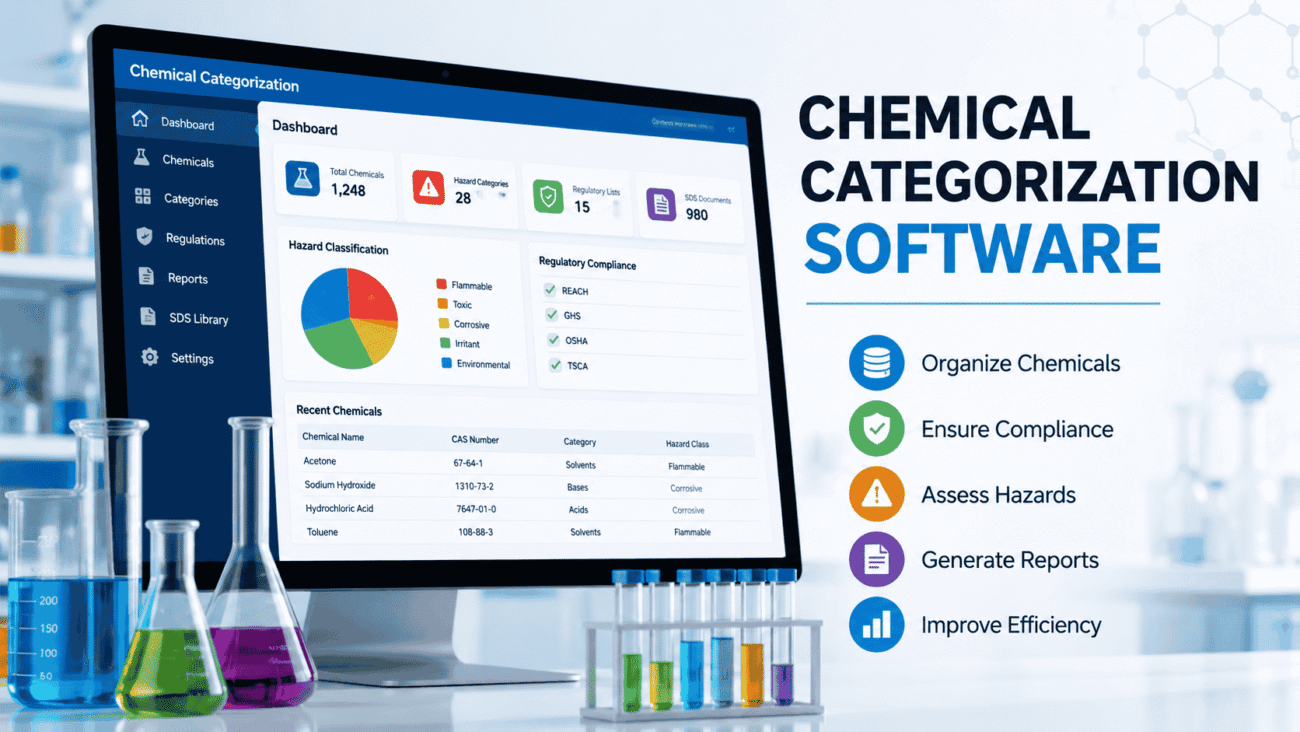
Chemical categorization software helps businesses organize, classify, and manage chemical substances according to regulatory requirements, safety standards, and internal workflows. Instead of relying on spreadsheets or manual reviews, these tools automate much of the categorization process, making it easier to stay compliant, reduce errors, and improve efficiency.
Whether you work in manufacturing, research, healthcare, cosmetics, or environmental compliance, choosing the right software can save countless hours while reducing the risk of costly mistakes. In this guide, you’ll learn how chemical categorization software works, what features matter most, and how to choose a solution that fits your organization.
Why Chemical Categorization Software Matters
Every organization that handles chemicals collects large amounts of information. Product formulas, safety data sheets (SDS), hazard classifications, regulatory lists, transportation requirements, and environmental reporting all need to be managed accurately.
When this information is scattered across multiple files or handled manually, problems quickly appear.
Common challenges include:
- Duplicate chemical records
- Inconsistent naming conventions
- Regulatory compliance risks
- Outdated hazard classifications
- Time-consuming audits
- Difficulty locating safety information
Chemical categorization software brings all this information into a centralized system, making it easier to search, update, and verify chemical data.
What Is Chemical Categorization Software?
Chemical categorization software is a digital platform designed to classify chemical substances based on their physical, chemical, toxicological, and regulatory characteristics.
Instead of simply storing chemical names, the software creates structured information that supports decision-making across multiple departments.
For example, a manufacturer producing industrial cleaners may have hundreds of ingredients sourced from different suppliers. The software helps identify:
- Hazard classes
- Chemical families
- Regulatory restrictions
- Storage requirements
- Transportation classifications
- Environmental impact categories
Rather than repeating manual reviews every time a new product is created, the software automatically references existing information whenever possible.
How Chemical Categorization Software Works
Although every platform is different, most follow a similar workflow.
Step 1: Import Chemical Data
Information can come from:
- Safety Data Sheets
- Laboratory databases
- ERP systems
- Supplier documentation
- CSV or Excel files
- Regulatory databases
The software organizes all imported information into a searchable database.
Step 2: Standardize Chemical Information
Chemical names often vary.
For example, one supplier may write:
Sodium Chloride
Another may write:
NaCl
Another may include additional formatting.
The software identifies equivalent substances and standardizes records to reduce duplication.
Step 3: Apply Classification Rules
The software compares available information against predefined rules.
These rules may include:
- Physical hazards
- Health hazards
- Environmental hazards
- Toxicity categories
- Exposure limits
- Storage classes
Many modern platforms also support automatic classification based on globally recognized standards.
Step 4: Generate Reports
Once categorization is complete, reports can be created for:
- Compliance audits
- Internal reviews
- Product documentation
- Regulatory submissions
- Inventory management
- Safety teams
Because the data is already organized, reporting becomes much faster.
Industries That Benefit Most
Chemical categorization software isn’t limited to chemical manufacturers.
Many industries rely on accurate chemical classification.
Manufacturing
Manufacturers often manage thousands of raw materials across multiple facilities.
Software helps ensure every material is classified consistently before production begins.
Pharmaceuticals
Drug manufacturers work with highly regulated ingredients.
Proper categorization supports documentation, quality control, and regulatory compliance throughout the product lifecycle.
Cosmetics
Cosmetic companies frequently reformulate products.
The software makes it easier to determine whether new ingredients affect product classifications or regulatory obligations.
Universities and Research Labs
Research facilities typically store hundreds of chemicals with different hazard levels.
Categorization software helps researchers maintain organized inventories while supporting laboratory safety.
Environmental Consulting
Consultants often review hazardous materials for clients.
Having reliable categorization software speeds up environmental assessments and compliance reporting.
Key Features to Look For
Not every software package offers the same capabilities.
When evaluating options, focus on features that solve real operational problems rather than simply adding complexity.
Centralized Chemical Database
A searchable database is the foundation of any good system.
Users should be able to locate chemicals quickly using:
- Chemical name
- CAS number
- Product name
- Supplier
- Hazard category
Fast searching reduces wasted time across departments.
Regulatory Database Integration
Regulations change regularly.
Software that connects with updated regulatory sources helps organizations keep classifications current without constant manual research.
Automatic Hazard Classification
Instead of assigning hazard categories manually, many systems evaluate available data and recommend classifications.
This reduces human error while improving consistency.
Safety Data Sheet Management
Managing SDS documents manually becomes difficult as inventories grow.
Many software solutions automatically connect SDS files with categorized substances, making retrieval much easier during inspections.
Reporting Tools
Reporting should require only a few clicks.
Look for customizable reports that support:
- Compliance reviews
- Internal audits
- Inventory summaries
- Hazard communication
- Regulatory documentation
User Permissions
Different employees require different levels of access.
Quality managers, laboratory staff, compliance officers, and executives often need different permissions.
Role-based access helps protect sensitive information while simplifying collaboration.
Integration with Existing Systems
Many organizations already use:
- ERP software
- Laboratory Information Management Systems (LIMS)
- Inventory software
- Procurement platforms
Integration reduces duplicate data entry and improves overall efficiency.
Cloud-Based vs. On-Premises Solutions
One of the first decisions organizations face is choosing between cloud and on-premises software.
| Feature | Cloud-Based | On-Premises |
|---|---|---|
| Setup Time | Fast | Longer |
| Upfront Cost | Lower | Higher |
| Maintenance | Vendor-managed | Internal IT |
| Accessibility | Anywhere with internet | Local network unless configured |
| Updates | Automatic | Manual |
| Scalability | Easier | Requires additional infrastructure |
Cloud solutions appeal to many businesses because updates and backups are handled automatically.
Organizations with strict internal security policies, however, may still prefer on-premises deployments.
Benefits Beyond Compliance
Many people assume chemical categorization software exists only for regulatory compliance.
In reality, the operational benefits often become even more valuable over time.
For example, procurement teams can avoid purchasing duplicate chemicals because the software highlights existing inventory. Laboratory managers can quickly determine whether a substance is already available before placing new orders. Safety officers gain faster access to hazard information during routine inspections or emergency situations.
The result is better communication across departments and more efficient day-to-day operations.
How to Choose the Right Chemical Categorization Software
Not every business has the same requirements.
A small laboratory managing a few hundred chemicals has very different needs than a multinational manufacturer with thousands of substances across multiple facilities.
Before evaluating vendors, consider these questions:
- How many chemical records will you manage?
- Which regulations apply to your business?
- Do multiple departments need access?
- Will the software integrate with your existing systems?
- How often do classifications need updating?
- Is remote access important for your team?
Creating a checklist before requesting product demonstrations makes comparisons much easier.
Manual Chemical Categorization vs. Software
Many organizations begin with spreadsheets because they are familiar and inexpensive. That approach may work for a small inventory, but it becomes difficult to maintain as the number of chemicals grows.
Here’s how manual methods compare with dedicated software.
| Feature | Manual Process | Chemical Categorization Software |
|---|---|---|
| Data Organization | Multiple spreadsheets | Centralized database |
| Accuracy | Depends on the user | Consistent classification rules |
| Regulatory Updates | Manual research | Easier to update |
| Search Speed | Slow for large inventories | Instant search |
| Reporting | Time-consuming | Automated reports |
| Collaboration | Limited | Multi-user access |
| Audit Preparation | Labor intensive | Faster documentation |
| Scalability | Difficult | Designed for growth |
The larger your chemical inventory becomes, the more noticeable these differences are. Even medium-sized businesses often discover that the time saved during audits alone justifies the investment.
Pros and Cons of Chemical Categorization Software
Like any business tool, chemical categorization software has strengths and limitations.
Pros
- Reduces manual data entry
- Improves consistency across departments
- Makes regulatory compliance easier to manage
- Speeds up chemical searches
- Simplifies reporting and documentation
- Helps reduce duplicate inventory
- Supports safer handling of hazardous substances
- Improves audit readiness
Cons
- Initial setup may require significant planning.
- Existing data often needs cleaning before migration.
- Staff training takes time.
- Some advanced platforms have a steep learning curve.
- Subscription or licensing costs can be substantial for enterprise solutions.
Despite these challenges, most organizations see long-term gains once the system is fully implemented.
Common Mistakes to Avoid
Buying software is only one part of improving chemical data management. How it’s implemented has an even greater impact on success.
Choosing Software Based Only on Price
The least expensive option isn’t always the best value.
If the software lacks critical compliance features or integration capabilities, your team may end up spending more time working around its limitations.
Instead, focus on the total cost of ownership, including implementation, support, updates, and training.
Ignoring Data Quality
Even excellent software cannot fix poor data automatically.
Before importing information, review:
- Duplicate records
- Missing CAS numbers
- Incorrect chemical names
- Outdated Safety Data Sheets
- Inconsistent units of measurement
Starting with clean data leads to better classifications and more reliable reporting.
Skipping Employee Training
Employees need to understand more than where to click.
They should know:
- How classifications are assigned
- When records should be updated
- How reports are generated
- Who is responsible for reviewing changes
Well-trained users make fewer mistakes and are more likely to use the software consistently.
Failing to Review Regulatory Updates
Chemical regulations continue to evolve.
Even software with automated updates benefits from periodic reviews to ensure classifications still align with applicable regulations in your industry and region.
Expert Tips for Successful Implementation
After working with organizations that manage chemical inventories, a few best practices consistently stand out.
Start with a Pilot Project
Rather than importing every chemical at once, begin with one department or product line.
This allows your team to identify issues before expanding the system across the organization.
Create Standard Naming Rules
Use consistent naming conventions from the beginning.
For example, decide whether records will primarily use:
- Common names
- IUPAC names
- CAS numbers
- Internal product codes
Standardization makes searching much easier later.
Assign Data Ownership
Someone should always be responsible for maintaining chemical records.
Without clear ownership, duplicate entries and outdated information gradually return.
Schedule Regular Reviews
Even after implementation, schedule periodic audits to check:
- Missing information
- Duplicate chemicals
- Expired SDS files
- Regulatory updates
- User permissions
Routine maintenance keeps the database accurate over time.
Real-World Example
Imagine a specialty coatings manufacturer that stores over 4,000 chemical substances across several production facilities.
Before implementing chemical categorization software, employees relied on separate spreadsheets maintained by different departments. The purchasing team sometimes ordered materials that were already in stock because inventories weren’t synchronized. During compliance audits, safety managers spent days gathering documentation from multiple locations.
After moving to a centralized categorization platform, the company organized chemical records in one searchable database. Hazard classifications became more consistent, reporting required less manual effort, and employees could quickly locate Safety Data Sheets during inspections.
While every organization’s experience is different, this example shows how structured chemical data management can improve daily operations beyond regulatory compliance.
Best Practices for Long-Term Success
Implementing software is only the beginning. To get lasting value, organizations should make chemical data management an ongoing process.
Some practical habits include:
- Review new chemical records before approving them.
- Archive outdated products instead of deleting historical information.
- Keep Safety Data Sheets current.
- Monitor software updates from the vendor.
- Train new employees as part of onboarding.
- Back up important records according to company policy.
- Conduct periodic internal audits to verify data accuracy.
These practices help maintain a reliable database that supports both operational efficiency and compliance.
FAQs
1. What is the main purpose of chemical categorization software?
Its primary purpose is to organize, classify, and manage chemical information while supporting regulatory compliance, workplace safety, and efficient data management.
2. Is chemical categorization software only useful for large companies?
No. Small laboratories, universities, healthcare facilities, and growing manufacturers can also benefit from improved organization and easier access to chemical information.
3. Can chemical categorization software replace Safety Data Sheets?
No. Safety Data Sheets remain essential documents. The software helps organize, manage, and access SDS files but does not replace them.
4. How often should chemical classifications be reviewed?
Organizations should review classifications whenever regulations change, new hazard information becomes available, or product formulations are updated. Regular internal audits are also recommended.
5. What should businesses consider before purchasing chemical categorization software?
Important factors include regulatory requirements, integration with existing systems, scalability, reporting capabilities, user permissions, customer support, and ease of use.
Conclusion
Chemical categorization software has become an essential tool for organizations that handle chemical substances regularly. Beyond helping meet regulatory requirements, it improves data accuracy, reduces manual work, and creates a more organized approach to managing chemical information.
The right solution depends on your organization’s size, industry, and compliance obligations. Rather than focusing only on features or pricing, consider how well the software fits your existing workflows and whether it can grow alongside your business.
A successful implementation also requires clean data, employee training, and ongoing maintenance. When these elements come together, chemical categorization software becomes more than a compliance tool—it becomes a valuable resource for improving efficiency, supporting workplace safety, and making informed decisions.
