For people living with diabetes, continuous glucose monitoring (CGM) systems can be life-changing dexcom g6 android app recall.
They provide real-time glucose readings, alerts for high and low blood sugar levels, and valuable information that helps users make treatment decisions throughout the day.
One of the most widely used CGM systems is the Dexcom G6.
Because users rely heavily on glucose alerts and notifications, any problem affecting the Dexcom app can become a serious concern. That’s exactly why the Dexcom G6 Android app recall attracted attention from healthcare professionals, regulators, and patients.
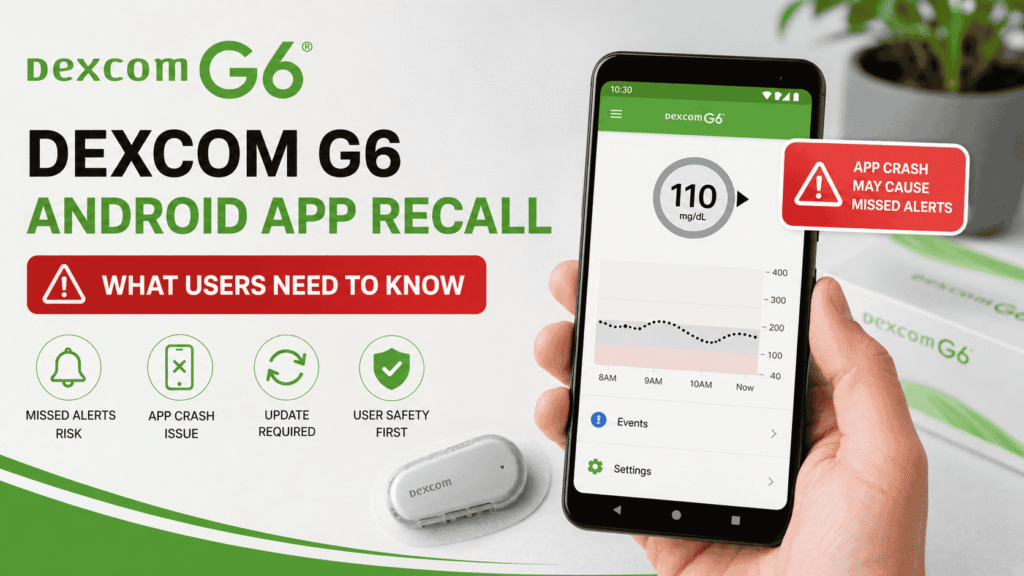
The recall involved a software issue in a specific version of the Dexcom G6 Android application that could cause the app to stop unexpectedly. When that happened, users might not receive important glucose alerts or notifications. The U.S. Food and Drug Administration (FDA) classified the issue as a Class I recall, the most serious type of recall category.
In this guide, we’ll explain what happened, who was affected, the risks involved, and what Dexcom users should know moving forward.
What Is the Dexcom G6 System?
Before discussing the recall, it’s helpful to understand how the system works.
The Dexcom G6 is a continuous glucose monitoring system designed for people with diabetes.
Instead of relying only on finger-stick blood glucose tests, the system continuously measures glucose levels throughout the day and night.
The system includes:
- A sensor worn on the body
- A transmitter
- A receiver or smartphone app
- Real-time glucose monitoring software
Many users choose to view their glucose readings through the Android app because it provides convenient access to alerts, notifications, and trend data.
Understanding the Dexcom G6 Android App
The Android application plays a major role in the overall Dexcom experience.
The app allows users to:
- Monitor glucose levels
- Receive low glucose alerts
- Receive high glucose alerts
- Track glucose trends
- Share glucose data with caregivers
- Review historical readings
For many users, these alerts are not just convenient.
They’re critical.
Missing a severe low or high blood sugar event could potentially lead to serious health consequences.
What Was the Dexcom G6 Android App Recall?
The Dexcom G6 Android app recall involved version 1.15.0 of the Dexcom G6 and G6 Pro Android U.S. application.
According to Dexcom and FDA documentation, a software defect could cause the application to terminate unexpectedly while in use. When the app stopped running, users could lose access to glucose readings, alarms, alerts, and notifications.
Because these alerts help users identify dangerous blood sugar levels, the issue was considered potentially serious.
The FDA later designated the action as a Class I recall.
Why Was the Recall Important?
At first glance, an app crash might not seem like a major problem.
But for a medical monitoring system, it’s different.
The Dexcom G6 app provides alerts that notify users when blood glucose levels become dangerously high or low.
If the app crashes unexpectedly, users may not receive:
- Low glucose warnings
- High glucose warnings
- Critical alarm notifications
- Real-time glucose updates
The FDA noted that missing these alerts could contribute to delayed recognition of hyperglycemia or hypoglycemia. In severe cases, this could potentially result in serious medical complications.
Which Version Was Affected?
One important detail often gets overlooked.
The recall did not affect every Dexcom G6 Android user.
The issue specifically involved:
| Product | Affected Version |
|---|---|
| Dexcom G6 Android App | Version 1.15.0 |
| Dexcom G6 Pro Android App | Version 1.15.0 |
According to FDA information, the correction only applied to users running version 1.15.0. Other versions were not included in the recall action.
How Many Users Were Affected?
Fortunately, the scope of the issue was relatively limited.
Dexcom detected the problem before the software was widely distributed.
Reports indicate that approximately 333 users downloaded the affected version before the rollout was stopped. Dexcom later stated that all affected users updated to corrected software versions.
Compared with many large-scale recalls, this was a relatively small group of users.
Still, because of the potential health risks, regulators treated the matter seriously.
What Did Dexcom Do?
Once the issue was identified, Dexcom acted quickly.
The company:
- Halted further rollout of the affected version
- Notified affected customers
- Released an updated version
- Instructed users to update immediately
The FDA later published details regarding the software correction and recommended affected users upgrade from version 1.15.0 as soon as possible.
Was the Product Removed From the Market?
No.
This is another point that sometimes creates confusion.
The recall was classified as a software correction rather than a complete product removal.
Users did not need to stop using the Dexcom G6 system entirely.
Instead, affected users needed to update the app to the corrected version.
How to Check Your Dexcom App Version
If you’re curious about your app version, checking is usually straightforward.
Step 1
Open the Dexcom G6 application.
Step 2
Navigate to:
- Settings
- About
- App Information
Step 3
Locate the software version number.
Step 4
Compare it with current Dexcom guidance.
If you’re unsure, contacting Dexcom support is always a good idea.
Signs an App May Not Be Working Properly
Regardless of the recall, users should watch for warning signs.
Potential issues include:
- Missing notifications
- Delayed glucose updates
- App crashes
- Unexpected shutdowns
- Sync problems
- Missing alarms
Any issue involving glucose alerts should be taken seriously.
Importance of Software Updates
One lesson from the recall is the importance of keeping medical applications updated.
Many users postpone software updates.
That’s understandable.
People worry about bugs or interface changes.
However, updates often include:
- Security improvements
- Bug fixes
- Compatibility updates
- Performance enhancements
For medical applications, updates can be especially important.
Android Compatibility Challenges
The recall also highlights a broader challenge facing healthcare apps.
Android devices vary significantly.
Manufacturers use different hardware, software customizations, and Android versions.
This creates additional testing challenges.
Dexcom has occasionally released compatibility guidance for Android users to ensure the application functions correctly across supported devices.
Tips for Dexcom G6 Android Users
Whether or not you were affected by the recall, these best practices can help.
Enable Automatic Updates
This helps ensure you receive important fixes promptly.
Verify Notifications
Regularly check that alerts and alarms are enabled.
Test Your Settings
Confirm that sound, vibration, and notification permissions are working properly.
Keep Your Device Updated
Operating system updates can improve compatibility and security.
Monitor Official Communications
Pay attention to emails, alerts, and notices from Dexcom.
Dexcom G6 Recall vs Other Dexcom Issues
The Dexcom G6 Android app recall was separate from several other Dexcom-related safety notices that occurred around the same period.
These included:
- Receiver speaker issues
- G7 app corrections
- Sensor alert concerns
Each issue involved different products and different technical causes.
Because multiple notices appeared close together, some users understandably became confused about which products were affected.
FAQs
What was the Dexcom G6 Android app recall?
The recall involved version 1.15.0 of the Dexcom G6 and G6 Pro Android application due to a software defect that could cause the app to terminate unexpectedly.
Why was the recall classified as Class I?
The FDA classified it as a Class I recall because missed glucose alerts could potentially contribute to serious health risks.
Did all Dexcom G6 apps have the problem?
No. The issue specifically affected version 1.15.0 of the Android app.
Was the Dexcom G6 system recalled completely?
No. The action involved a software correction, not removal of the entire Dexcom G6 product line.
What should affected users do?
Affected users were instructed to update to the corrected software version immediately.
How many users were affected?
Reports indicate that approximately 333 users downloaded the affected version before rollout was halted.
Conclusion
The Dexcom G6 Android app recall serves as an important reminder that software plays a critical role in modern healthcare devices. While the issue affected a relatively small number of users, the potential consequences of missed glucose alerts made it a serious matter.
Fortunately, Dexcom identified the problem early, halted distribution of the affected software, notified users, and released a corrected version. Regulatory agencies also acted quickly by classifying the issue appropriately and providing guidance to affected users.
For Dexcom G6 users, the key takeaway is simple: keep your app updated, monitor notifications carefully, and pay attention to official safety communications. These small steps can help ensure that your continuous glucose monitoring system continues to provide the reliable information you depend on every day.