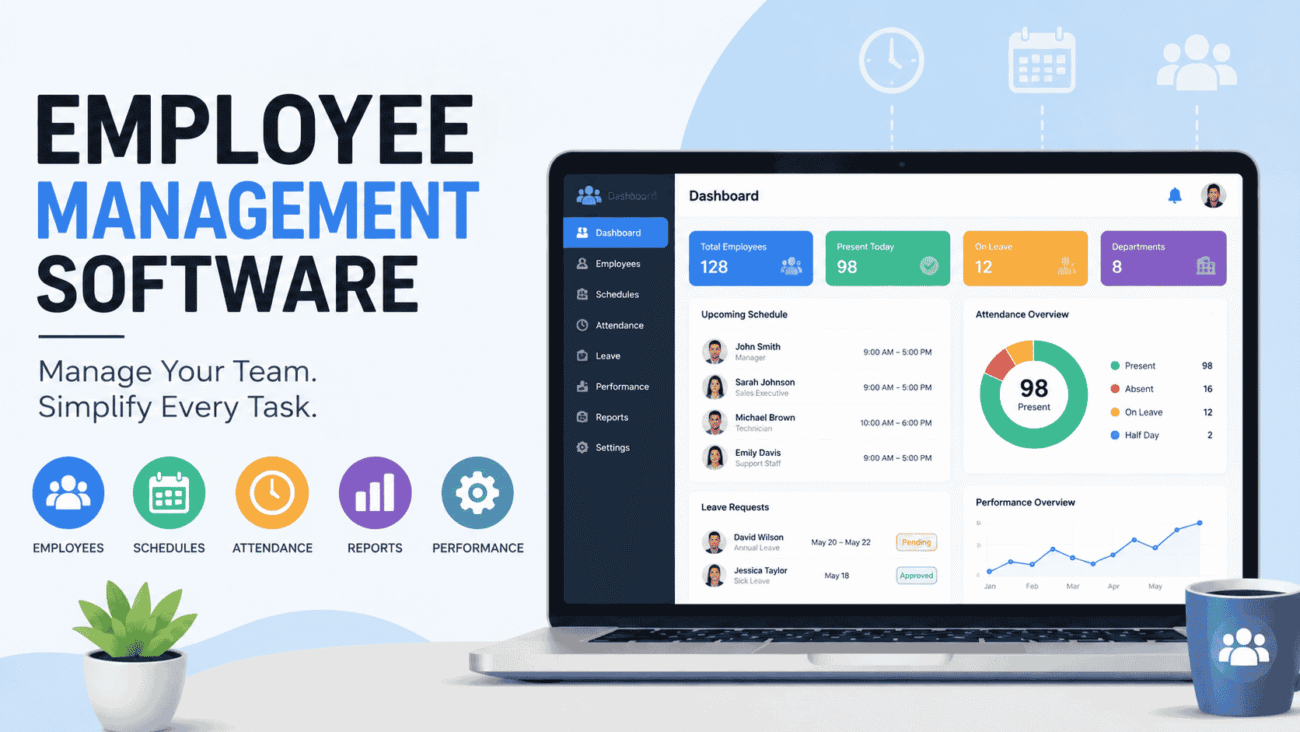
Managing employees becomes more challenging as a business grows. What starts with a handful of workers and a spreadsheet can quickly turn into scheduling conflicts, missed time-off requests, payroll errors, and communication gaps. That’s why many companies invest in employee management software to simplify daily operations.
Whether you’re running a small startup, a retail store, or a growing company with multiple departments, the right software can help you organize employee information, monitor attendance, manage schedules, and improve team communication from one central platform.
If you’re researching employee management software for small business, comparing the best employee management software, or looking for retail employee management software, this guide will help you understand what these tools do, the features that matter most, and how to choose a solution that fits your business.
What Is Employee Management Software?
Employee management software is a digital platform designed to help businesses organize workforce-related tasks. Instead of using separate spreadsheets, paper files, and multiple applications, employers can manage employee records, schedules, attendance, performance, and communication in one place.
Depending on the software, it may also include tools for:
- Time tracking
- Leave management
- Payroll integration
- Employee onboarding
- Performance reviews
- Training management
- Shift scheduling
- Document storage
- Reporting and analytics
The goal is to reduce administrative work while giving managers better visibility into their workforce.
Why Businesses Are Switching to Employee Management Software
Many businesses don’t realize how much time is spent on manual administrative tasks until they automate them.
Imagine a company with 40 employees. Managers spend hours every week approving vacation requests, updating schedules, tracking attendance, and answering payroll questions.
With employee management software, many of these tasks become automated, allowing managers to focus on coaching employees and growing the business instead of handling paperwork.
The result is often improved efficiency, fewer administrative errors, and a better experience for employees.
How Employee Management Software Works
Most platforms operate through a secure cloud-based system that employees and managers can access from computers or mobile devices.
Employees typically log in to:
- View work schedules
- Clock in and out
- Submit time-off requests
- Download pay stubs
- Update personal information
- Complete required training
- Receive company announcements
Managers use the same platform to approve requests, monitor attendance, assign shifts, generate reports, and oversee workforce performance.
Because everyone works from the same system, communication becomes more organized and transparent.
Key Features to Look For
Not every business needs every feature. The right software depends on your company size, industry, and daily operations.
Here are the capabilities that deliver the most value.
Employee Database
Every employee has important information that needs to stay organized.
A centralized employee database typically stores:
- Contact details
- Employment history
- Emergency contacts
- Job titles
- Certifications
- Performance records
- Employment documents
Having this information available in one secure location reduces paperwork and makes record management much easier.
Time and Attendance Tracking
Tracking employee hours manually can lead to mistakes.
Modern software often allows employees to clock in using:
- Mobile apps
- Desktop computers
- Tablets
- Biometric devices
- GPS-enabled devices for remote workers
Automatic time tracking helps improve payroll accuracy while reducing administrative work.
Shift Scheduling
Scheduling employees becomes increasingly difficult as teams grow.
Employee management software allows managers to:
- Build weekly schedules
- Assign shifts
- Handle shift swaps
- Notify employees instantly
- Prevent scheduling conflicts
Employees can usually view updated schedules from their mobile devices.
Leave Management
Vacation requests, sick leave, and personal days are easier to manage through digital workflows.
Instead of sending emails or paper forms, employees submit requests online, and managers receive automatic notifications for approval.
This creates a clear record while reducing confusion.
Performance Management
Many platforms include tools for setting goals, conducting performance reviews, tracking employee development, and documenting feedback.
Managers can identify strengths, address concerns early, and support employee growth through regular evaluations.
Employee Management Software for Small Business
Small businesses often assume employee management software is only for large corporations.
In reality, smaller organizations frequently benefit the most because they have limited administrative resources.
A business with 15 employees may not have a dedicated HR department. Owners often manage hiring, scheduling, payroll coordination, and employee communication themselves.
The right software helps automate routine tasks without requiring additional staff.
For example, a local landscaping company can use employee management software to assign crews, track hours, approve leave requests, and store employee documents from a single dashboard.
Likewise, a small accounting firm can monitor certifications, manage onboarding, and schedule annual performance reviews without relying on spreadsheets.
Retail Employee Management Software
Retail businesses face unique workforce challenges.
Schedules often change weekly, employee turnover may be higher than in other industries, and staffing needs fluctuate during holidays and busy seasons.
Retail employee management software is designed to handle these demands efficiently.
Common retail features include:
- Flexible shift scheduling
- Mobile schedule notifications
- Time clock integration
- Attendance monitoring
- Labor cost reporting
- Shift swapping
- Employee availability management
Consider a clothing store preparing for the holiday shopping season.
Managers may need to add temporary employees, adjust schedules frequently, and ensure adequate staffing during peak hours.
Using software makes these adjustments much faster than updating spreadsheets or making dozens of phone calls.
Best Employee Management Software: What Makes a Great Platform?
The “best” software isn’t necessarily the one with the most features.
It’s the one that solves your business problems while remaining easy for employees to use.
When comparing platforms, pay attention to several important factors.
Ease of Use
Employees shouldn’t need extensive training just to request time off or check their schedules.
An intuitive interface encourages adoption across the organization.
Mobile Accessibility
Today’s workforce expects mobile access.
Whether employees work remotely, travel between job sites, or spend most of their day on the sales floor, mobile apps allow them to stay connected.
Integration Capabilities
Employee management software often works alongside:
- Payroll systems
- Accounting software
- HR platforms
- Communication tools
- Recruiting software
Choosing software that integrates with existing systems reduces duplicate data entry and improves efficiency.
Reporting Tools
Managers need accurate information to make informed decisions.
Good reporting features help monitor:
- Attendance trends
- Overtime
- Labor costs
- Employee turnover
- Productivity
- Time-off balances
These insights help identify patterns before they become larger problems.
Comparing Employee Management Software Features
Different businesses prioritize different capabilities.
The table below highlights common features and their primary benefits.
| Feature | Business Benefit |
|---|---|
| Employee Records | Centralized workforce information |
| Attendance Tracking | More accurate payroll and reporting |
| Shift Scheduling | Improved workforce planning |
| Leave Management | Faster approval process |
| Mobile Access | Better communication with employees |
| Performance Reviews | Supports employee development |
| Payroll Integration | Reduces manual data entry |
| Reporting Dashboard | Better workforce insights |
Rather than selecting software based solely on feature lists, consider how each capability supports your company’s daily operations.
Real-World Example
Imagine a regional restaurant chain with five locations.
Before adopting employee management software, each manager created schedules independently using spreadsheets. Employees often called supervisors to confirm shifts, vacation requests were misplaced, and payroll adjustments were common.
After implementing a centralized workforce management platform, schedules became available through a mobile app, time-off requests followed a standardized approval process, and attendance records synchronized with payroll. Managers spent less time handling administrative work and more time supporting their teams and improving customer service.
This example illustrates why businesses across many industries continue to invest in workforce management technology.
Benefits of Employee Management Software
Implementing employee management software isn’t just about replacing paper files or spreadsheets. The real value comes from improving everyday operations and creating a better experience for both managers and employees.
Saves Valuable Time
Routine administrative tasks can consume hours every week.
With automation, managers spend less time approving leave requests, creating schedules, updating employee records, and tracking attendance. The time saved can be redirected toward coaching employees, improving customer service, or growing the business.
Improves Communication
Employees want quick access to information about their schedules, time-off requests, company announcements, and important documents.
Instead of relying on emails or printed notices, software keeps everyone connected through a single platform.
Reduces Human Error
Manual data entry often leads to mistakes, especially when employee information is stored in multiple places.
By centralizing records and automating repetitive tasks, businesses reduce the risk of payroll discrepancies, scheduling conflicts, and inaccurate attendance tracking.
Supports Better Decision-Making
Many employee management platforms include dashboards and reports that help managers understand workforce trends.
For example, a manager may notice increasing overtime in one department or identify staffing shortages before they affect productivity.
Having access to accurate information allows leaders to make informed decisions based on real data rather than assumptions.
Pros and Cons of Employee Management Software
Like any business investment, employee management software has advantages and limitations.
Pros
- Centralizes employee information.
- Simplifies scheduling and attendance tracking.
- Improves communication across teams.
- Automates repetitive administrative tasks.
- Supports performance management.
- Integrates with payroll and HR systems.
- Provides valuable workforce insights through reporting.
Cons
- Initial setup requires time and planning.
- Employees may need training to use new features.
- Advanced tools may increase subscription costs.
- Data migration from older systems can take effort.
- Some businesses may pay for features they rarely use.
The best results come from choosing software that matches your company’s current needs while leaving room for future growth.
Common Mistakes Businesses Make
Technology can simplify workforce management, but only if it’s implemented thoughtfully.
Here are some common mistakes to avoid.
Choosing Software Based Only on Price
Budget is important, but selecting the least expensive option isn’t always the smartest decision.
A lower-cost platform may lack the reporting, integrations, or automation your business needs as it grows.
Instead, focus on overall value rather than the lowest monthly fee.
Ignoring Employee Feedback
Managers often evaluate software without asking employees what they actually need.
For example, field workers may prioritize mobile access, while office staff may need better document management.
Gathering feedback before making a purchase helps ensure the platform works for everyone.
Poor Data Organization
A software platform is only as useful as the information stored inside it.
Keeping employee records updated and maintaining consistent data entry practices improves reporting and reduces confusion.
Skipping Training
Even user-friendly software benefits from proper onboarding.
Short training sessions, written guides, and ongoing support help employees become comfortable with new processes more quickly.
Expert Tips for Choosing the Right Solution
Selecting employee management software can feel overwhelming because there are so many options available.
These practical tips can make the decision easier.
Identify Your Biggest Challenges
Before comparing software, list the problems you want to solve.
For example:
- Scheduling conflicts
- Attendance tracking
- Payroll coordination
- Employee communication
- Performance reviews
- Document management
Knowing your priorities helps you focus on the features that matter most.
Think About Future Growth
The software you choose today should still meet your needs a few years from now.
If you expect to hire additional employees, open new locations, or expand into different markets, look for a platform that can grow with your business.
Test Before You Buy
Many providers offer free trials or product demonstrations.
Take advantage of these opportunities to explore the interface, mobile app, reporting tools, and customer support before making a long-term commitment.
Check Integration Options
Most businesses already use accounting, payroll, or communication software.
Choosing an employee management platform that integrates with your existing systems reduces duplicate work and improves efficiency.
Which Industries Benefit Most?
Employee management software is useful in almost every industry.
Some of the most common include:
- Retail
- Restaurants
- Healthcare
- Construction
- Manufacturing
- Hospitality
- Professional services
- Education
- Transportation
- Warehousing
- Nonprofit organizations
- Home service businesses
Each industry has unique workforce challenges, but the need for organized employee information, scheduling, and communication remains the same.
FAQs
What is employee management software?
Employee management software is a digital platform that helps businesses organize employee records, manage schedules, track attendance, monitor performance, and improve communication from a centralized system.
What is the best employee management software?
The best employee management software depends on your business size, industry, budget, and required features. Rather than focusing on brand names alone, compare usability, integrations, reporting, customer support, and scalability to find the right fit.
Is employee management software for small business worth it?
Yes. Small businesses often benefit significantly because the software automates administrative tasks, reduces paperwork, and helps owners manage employees more efficiently without hiring additional administrative staff.
How does retail employee management software help stores?
Retail employee management software simplifies shift scheduling, tracks attendance, manages employee availability, supports shift swaps, and helps managers respond quickly to changing staffing needs during busy seasons.
Can employee management software integrate with payroll systems?
Many modern platforms integrate with payroll, accounting, HR, and time-tracking solutions. Before choosing software, verify that it supports the integrations your business requires.
Conclusion
Managing employees becomes more complex as businesses grow, but the right technology can simplify many of the daily responsibilities that consume valuable time.
Whether you’re searching for employee management software for small business, evaluating the best employee management software, or comparing retail employee management software, the most important step is identifying the challenges you want to solve.
Features like attendance tracking, scheduling, leave management, performance reviews, and reporting can improve efficiency while creating a better experience for both employees and managers.
Rather than choosing software with the longest feature list, focus on finding a solution that fits your workflow, supports future growth, and is easy for your team to use. A thoughtful investment today can help your business operate more smoothly for years to come.
